Bookmarks · personal planner

Get back to the links you saved.

GuardaFlow keeps everything you save in one place. Turn it into a task if you like, and get reminded when the time comes.

Try it now Free · No sign-up · Your data stays in your browser

Saving is easy. Getting back is hard.

Until now
The link sits in an open tab, until one day the tab gets closed.
The link lands in your inbox. Its title and reading time fill in by themselves.
Every open tab eats memory; a single tab can hold hundreds of MB.
A saved link takes up next to no space. Close the tab without a second thought.
A week later you can't remember why you saved it.
The one-line note you wrote stays next to it. Nobody changes it.
The “I'll read it later” moment never comes.
You pick a time to read it. When it comes, GuardaFlow reminds you.

From inside the app.

Real screens with sample data. All of it is in the free version, no sign-up needed.

Tasks & calendar/planner

Tasks and planner

Turn a bookmark into a task: read, watch, apply. Plan it with a time on the weekly calendar or in the Today panel.
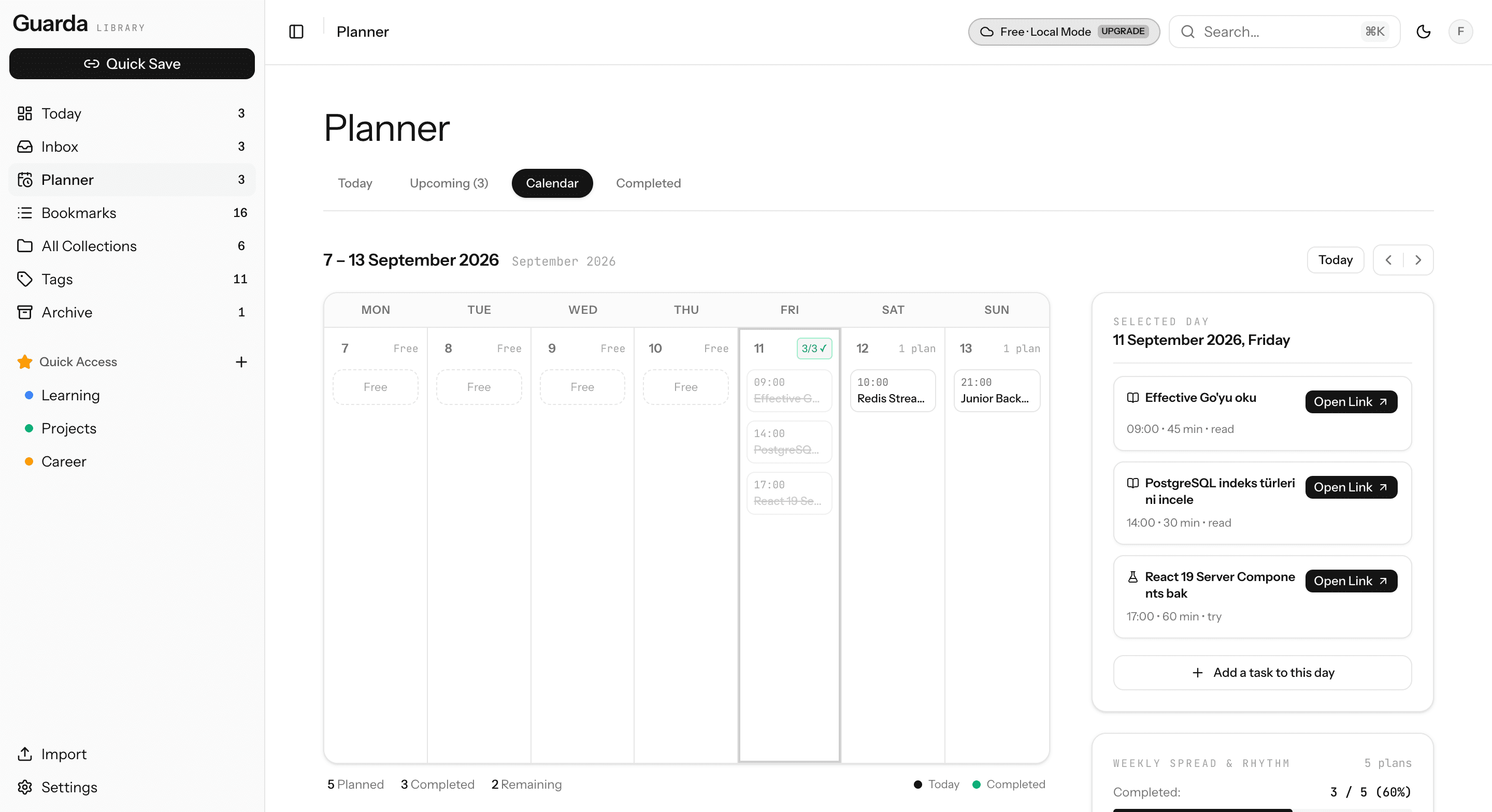
Planner: weekly calendar and the selected day's tasks
Hierarchy/collections

Collections and sub-folders

Build nested folders like Learning › Backend. See sub-collections and how many links they hold at a glance.
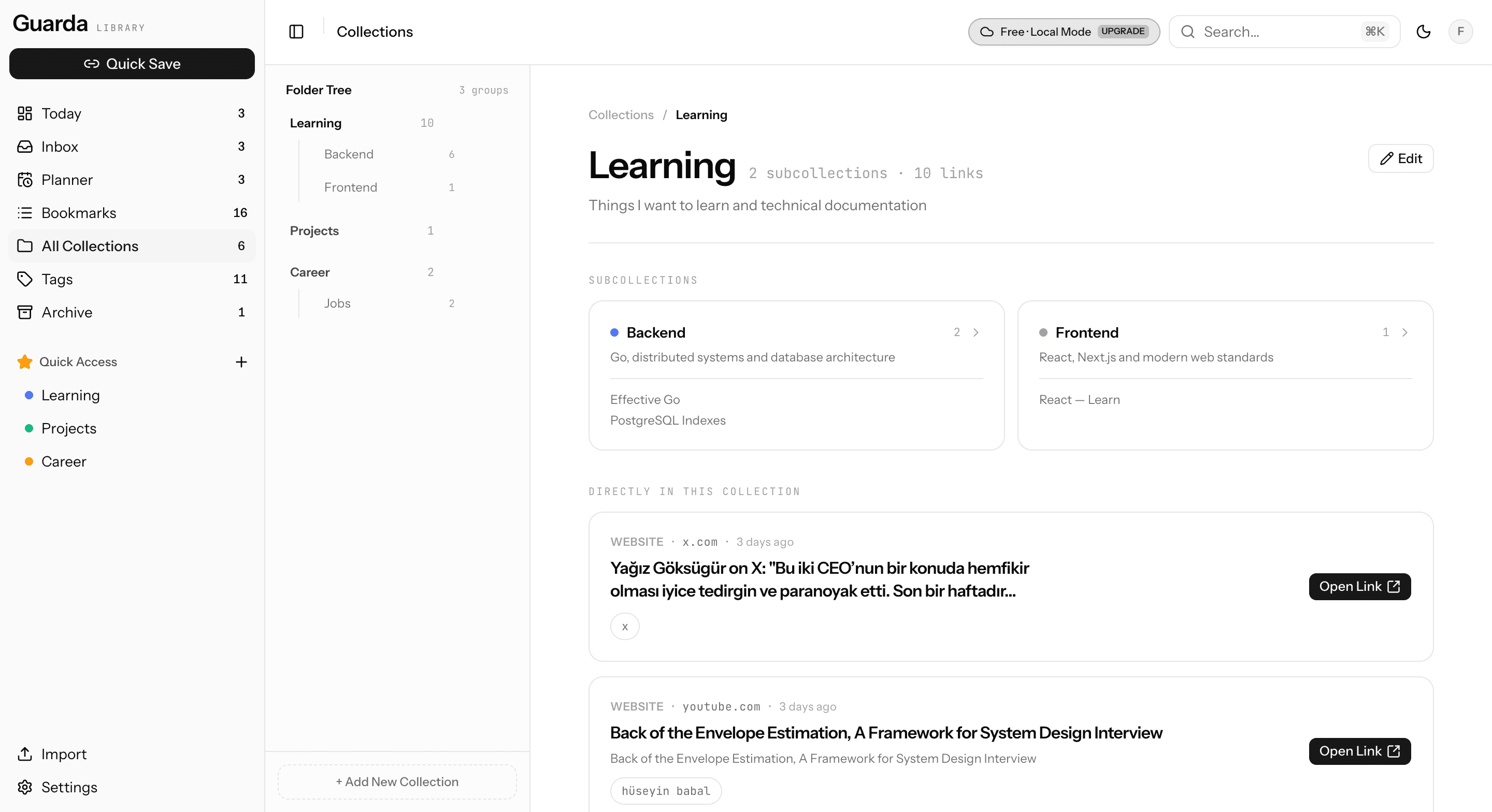
Collections: folder tree and sub-collection previews
Quick capture/inbox

Inbox

Save first, decide later. Move what's waiting into a collection, or turn it into a task in one click.
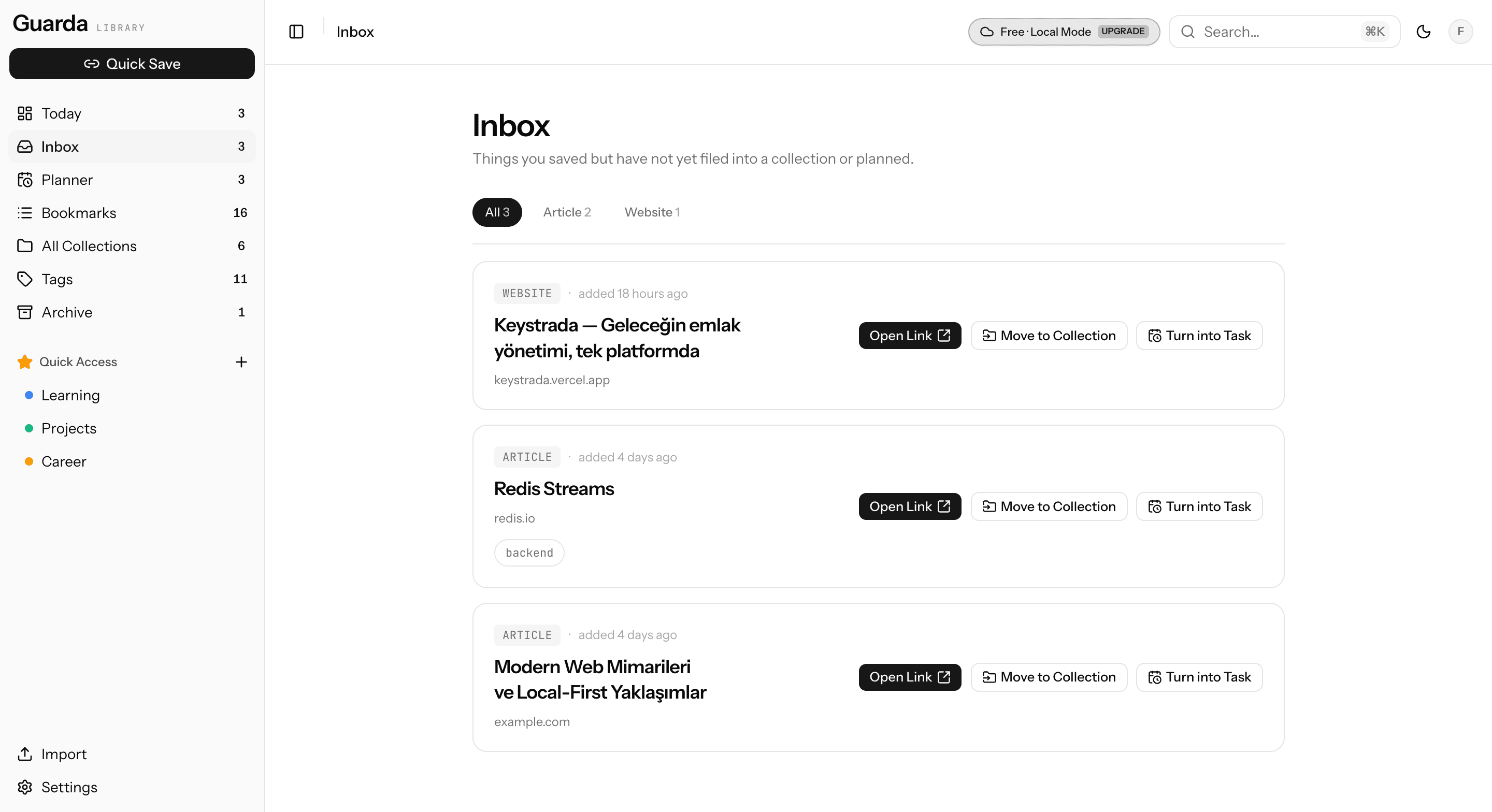
Inbox: unsorted bookmarks and quick actions
List/bookmarks

Every bookmark in one list

Type, collection, tags and date side by side. Search from anywhere with ⌘K, filter by collection or tag.
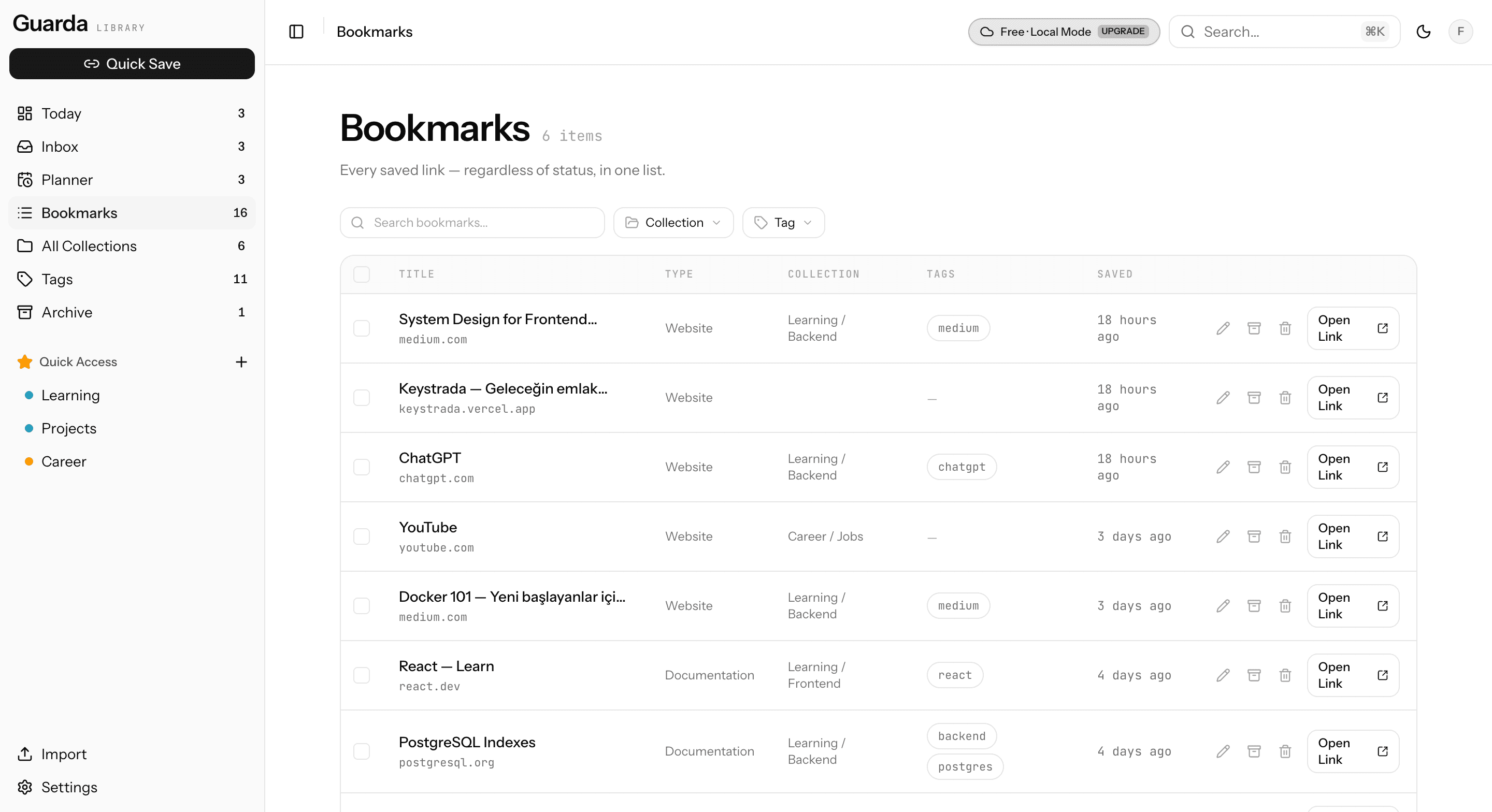
Bookmarks: filterable table view
Tags/tags

Tags

Sort your tags by how often you use them and rename them. Clear out the ones no bookmark uses in one click.
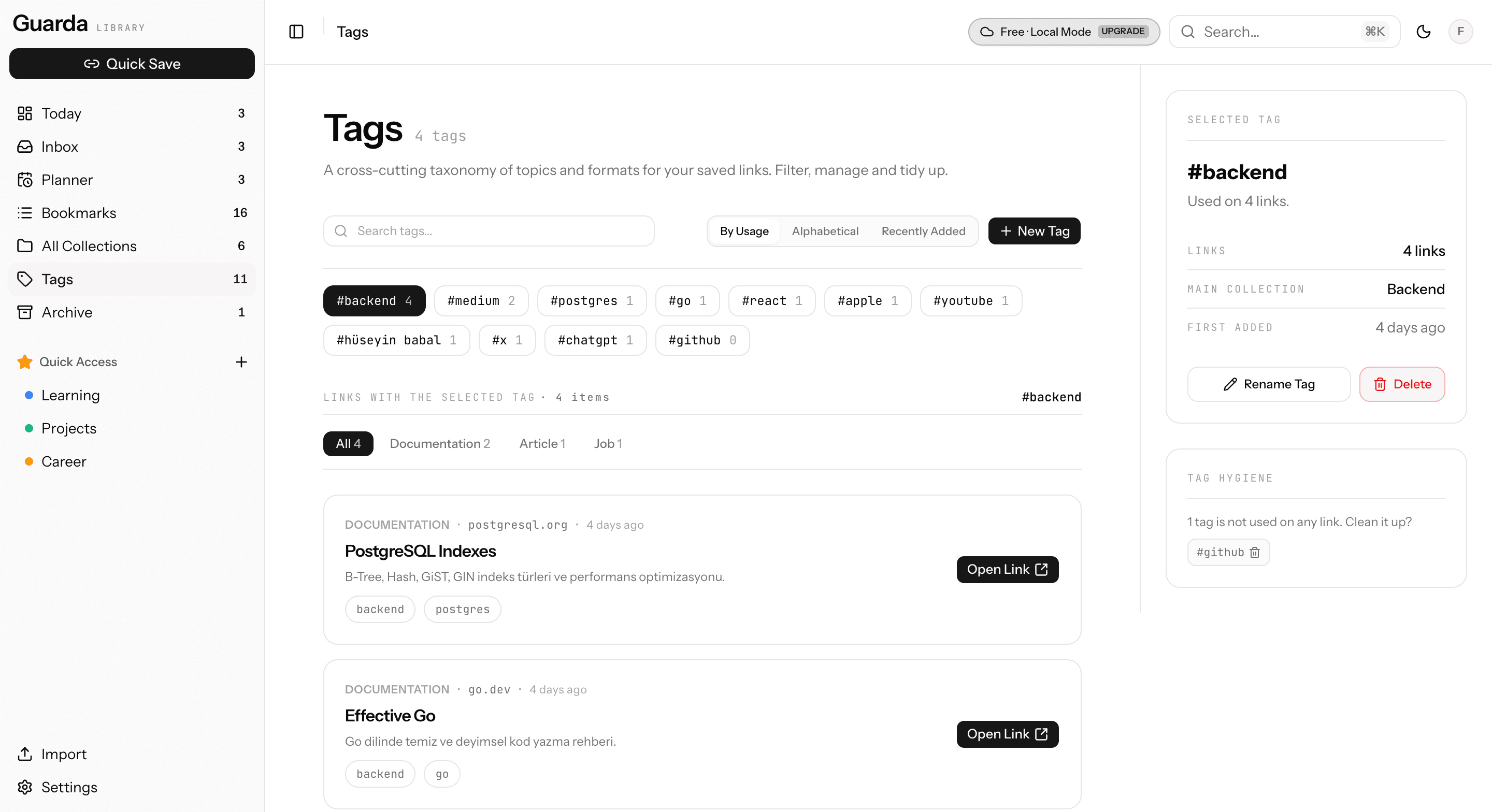
Tags: tag list with usage counts and the selected tag's bookmarks

Go ahead, trying it is free.

Open it, poke around, save your own links. No account, no card details.

Open the demoChanged your mind? Export your bookmarks as JSON anytime.
  • No sign-up

    No email, password or card. You start using it the moment it opens.

  • Your data stays in your browser

    In the free version your bookmarks are stored in this browser, not on our servers.

  • No time limit

    There's no trial to run out. It opens with sample data; switch to your own whenever you like.

Just the URL. The rest can wait.

Title, description and reading time are fetched in the background. Collections, tags and notes are there if you want them. None of them are required.

URL · the only required field
https://use-the-index-luke.com/
Collection
Learning / Backend
Tags
postgresqlbackend
Why are you saving this? optional, always yours
Needed for query optimization in the reporting service.
Make this a task too
⌘↵ to save · Esc to closeSave to Inbox

Your organization, your rules.

Nested collections, as many tags as you like. If GuardaFlow suggests something, you see it as a suggestion. Nothing changes unless you accept it.

Learning20
Backend12
Frontend5
AI3
Projects9
Ideas
References
Career4
golangpostgresqlsystem-designredisAcceptReject
Yesterday
researchRedis Streamsoverdue
redis.io
09:00
readPostgreSQL Indexing
use-the-index-luke.com · 18 min
14:00
readGo Concurrency Patterns
go.dev · 12 min
19:30
applyJunior Backend Developer
linkedin.com

Today's plan, from what you saved.

Open GuardaFlow and what you need to read, watch or apply to today is right there, in order. Overdue items come first.

It's not a project management tool. It's just for getting back to the things you saved.

Browser extension

Press ⌘⇧S on any site and the page lands in your inbox. Pick its tags or collection right there. Anything you save while GuardaFlow is closed waits in the extension and moves over when you open the app.

Save anything

GuardaFlow works out what kind of link it is. If it gets it wrong, you change it.

ArticleVideoGitHubProductJobDocumentationSocialWebsite

GuardaFlow suggests. You decide.

With Premium, for 500 bookmarks a month. It doesn't write text; it only picks among options.

Suggestion · PostgreSQL Indexing

AcceptEditReject

With Premium, your archive goes where you go.

The free version keeps everything in this browser. Premium moves your archive to the cloud and takes on a few more jobs so nothing you saved gets lost.

Cloud backup & every device

Your archive lives in the cloud instead of the browser. It survives clearing browser data, and it's the same archive on every device you sign in on.

Smart suggestions

A collection, tags and a task suggested for every bookmark. Nothing changes until you accept. 500 bookmarks a month.

Page copies and full-text search

A text copy of every page you save is kept. Search looks inside the page as well as the title, and the content is yours even if the link dies.

Dead link scan

Your links are checked regularly. A page that disappears gets flagged, with the Internet Archive's copy right there.

Calendar feed

Your planned tasks show up in Google, Apple or Outlook Calendar. Reset or turn off the feed address whenever you like.

Import

Bring in browser bookmarks and your Pocket, Raindrop.io and Instapaper saves. Tags and notes come along too.

Start free. Move to the cloud when you want.

There's no trial, because the free version already works in full. When you upgrade, the bookmarks and tasks in this browser move to the cloud without losing a thing.

Free
$0
No time limit
  • Bookmarks, collections, tags and tasks
  • Daily plan and weekly calendar
  • Browser extension
  • Data stays in this browser, no sign-up
  • JSON export
Try it now
Premium
$50/ year
2 months free
  • Everything in Free
  • Cloud backup, every device, unlimited capacity
  • Smart suggestions, 500 bookmarks a month
  • Page copies and full-text search
  • Dead link scan, with the Internet Archive's copy
  • Calendar feed and import
Premium features will be available soon
Free vs Premium
FeatureFreePremium
Bookmarks, collections, tags, tasks and planner
Browser extension
Where your data livesThis browserCloud
CapacityBrowser quotaUnlimited
Access from every device
Smart suggestions500 / month
Calendar feed (ICS)
Page copies and full-text search
Dead link scan
Import
JSON export

Questions

Do I need an account?

No. The free version works without signing up and keeps your data in this browser. You only need an account for Premium.

Is there a free trial?

No. The free version takes its place: saving, organizing and planning are all available with no time limit.

What happens to my local bookmarks when I upgrade?

Once your payment is confirmed, the bookmarks and tasks in this browser move to the cloud. Nothing is lost.

What if I cancel?

Premium stays on until the end of the period you paid for. After that your cloud archive is kept for a while; you can move it back into this browser and carry on with the free version, or download it as JSON or HTML.

How are payments handled?

Payments go through Polar. Your card details never reach GuardaFlow's servers. You manage or cancel your subscription on Polar's page.

What gets sent for smart suggestions?

Only the page's title, description and address go to the classification service. No text is generated, and your collections, tags and tasks don't change until you accept a suggestion.